L.J.K ConsultantStart a project

Slack Off

A local platform that takes a JIRA ticket from "Ready for Dev" to pull requests. Agents do the reading, drafting, coding and testing; you make every decision, from your desk or your phone.

  • AI agents
  • Multi-agent
  • React
  • Hono
  • Node
  • SQLite
  • Claude Code

Try the demo

Recorded from the real app in fake mode (fictional FAKE-* tickets; no JIRA, Claude or GitHub calls). Watch the recording (MP4)

01 / Context

The problem

A developer's ticket goes through the same chores every time: turn vague text into requirements, weigh a few approaches, write a design, code it in every affected repository, test it, open the pull requests and update JIRA. AI coding agents can do much of that work. But an agent that can push code, open pull requests and change tickets on its own is a risk most teams won't accept, and a single agent reviewing its own work isn't a real check.

02 / Solution

What we built

A platform that runs on the developer's own computer and moves each ticket through seven steps, each ending with a decision that is yours:

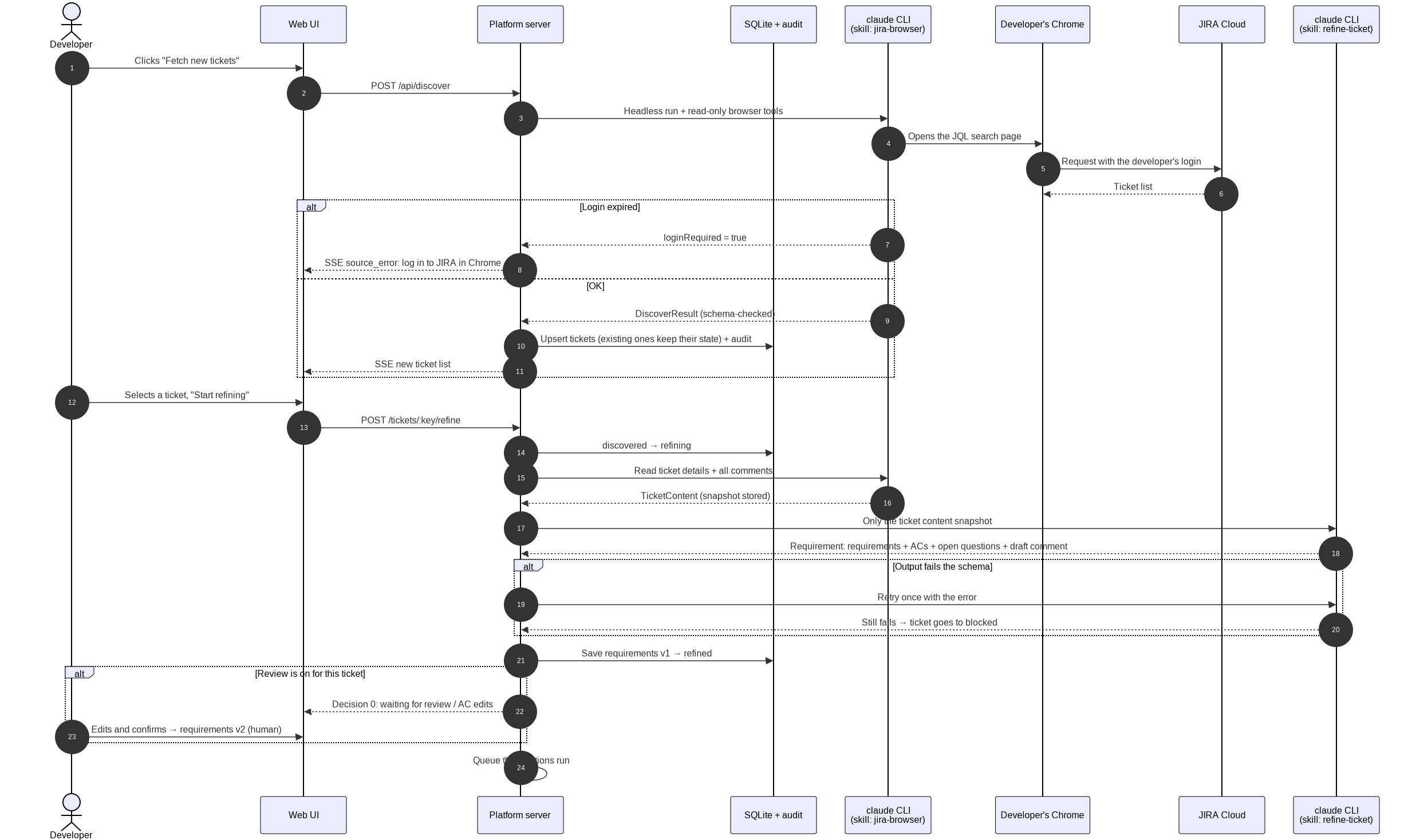
  1. Discover. Fetch the open tickets assigned to you and freeze an unchangeable snapshot of each one you work on.
  2. Requirements and acceptance criteria. An agent writes them, each traced to the sentence or comment it came from. A drift check compares every edit with the original ticket. If the ticket is unclear, the agent drafts a question to the reporter.
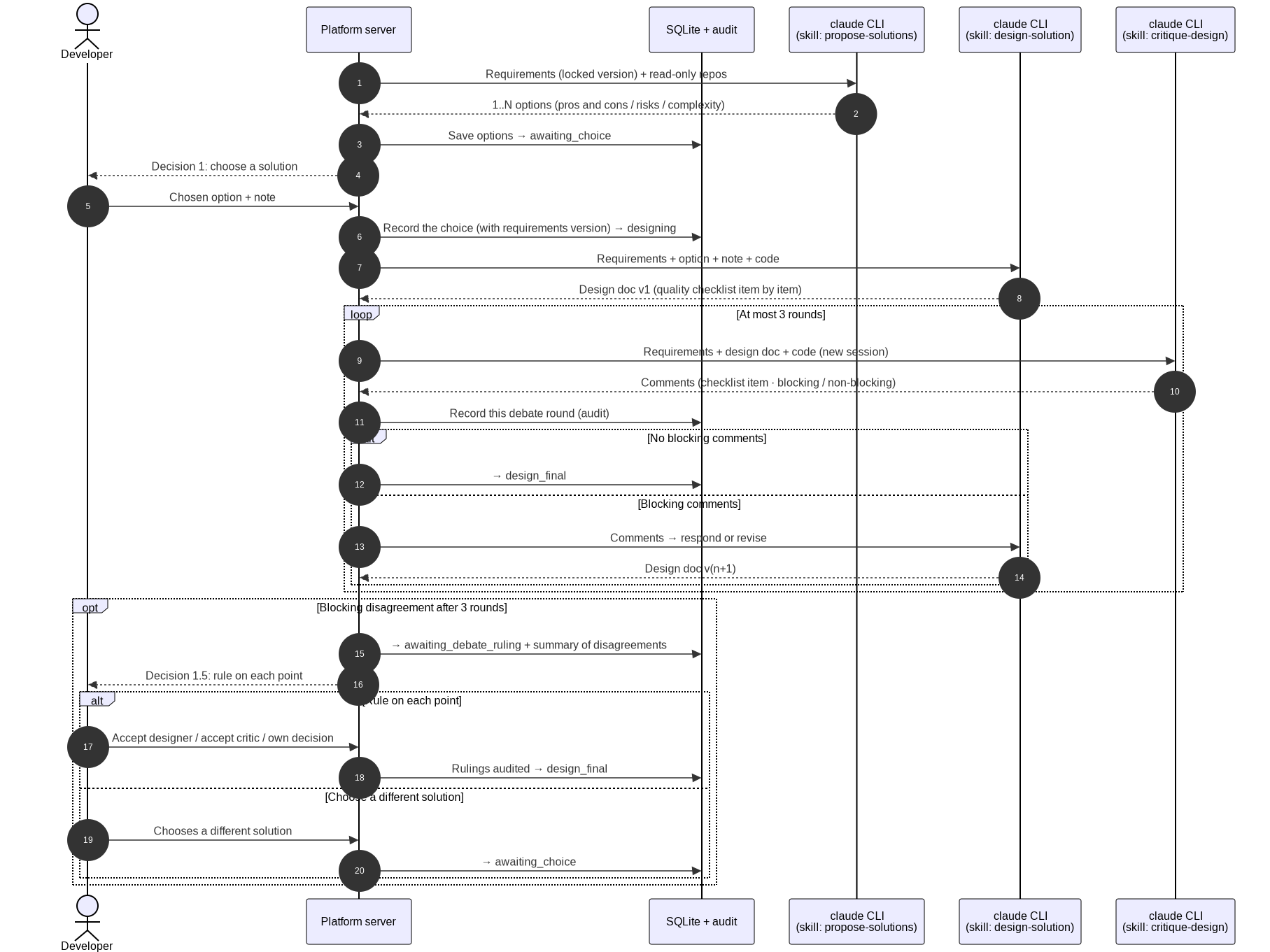
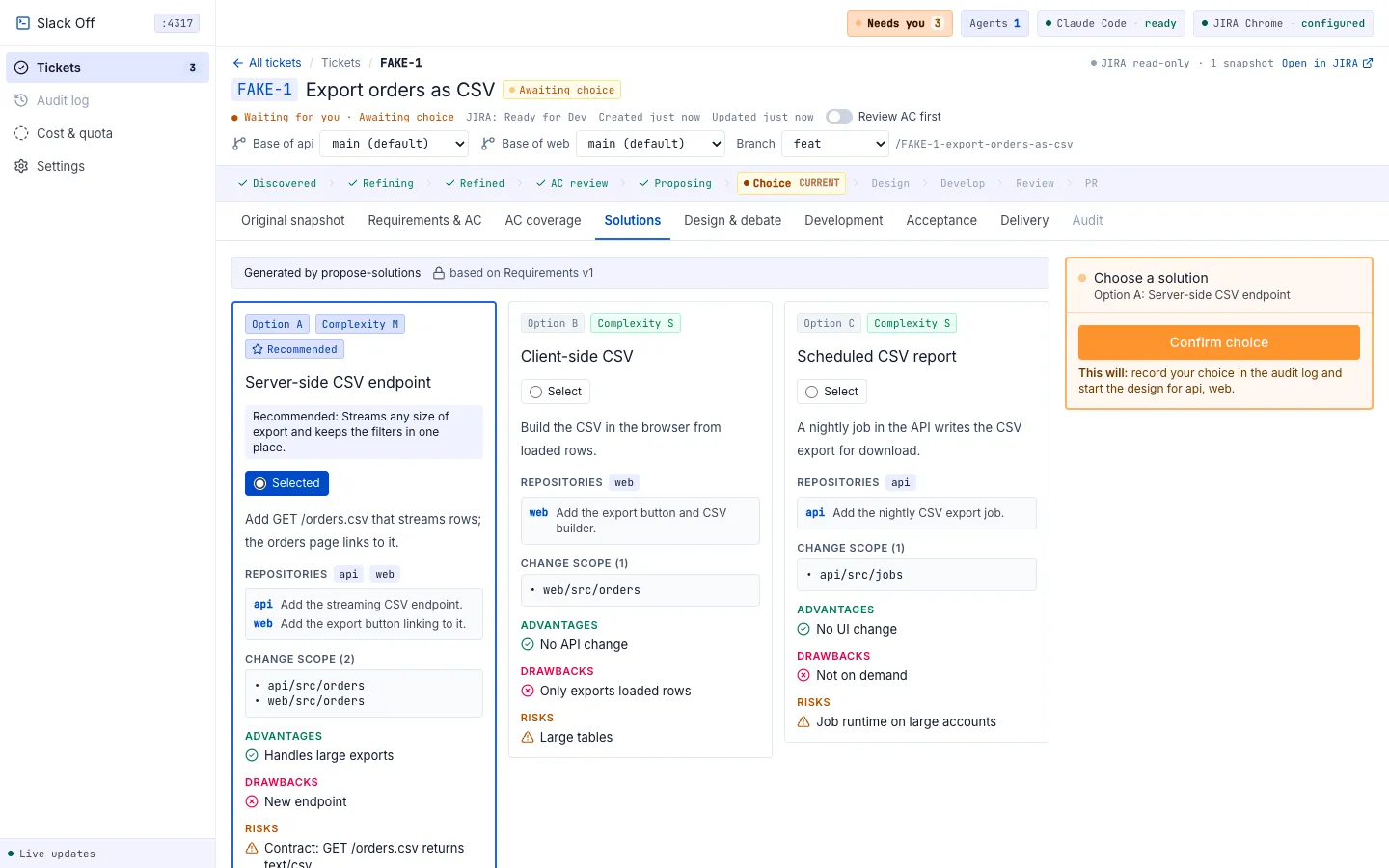
  3. Solutions. An agent proposes options with complexity, dependencies and affected repositories. You choose.
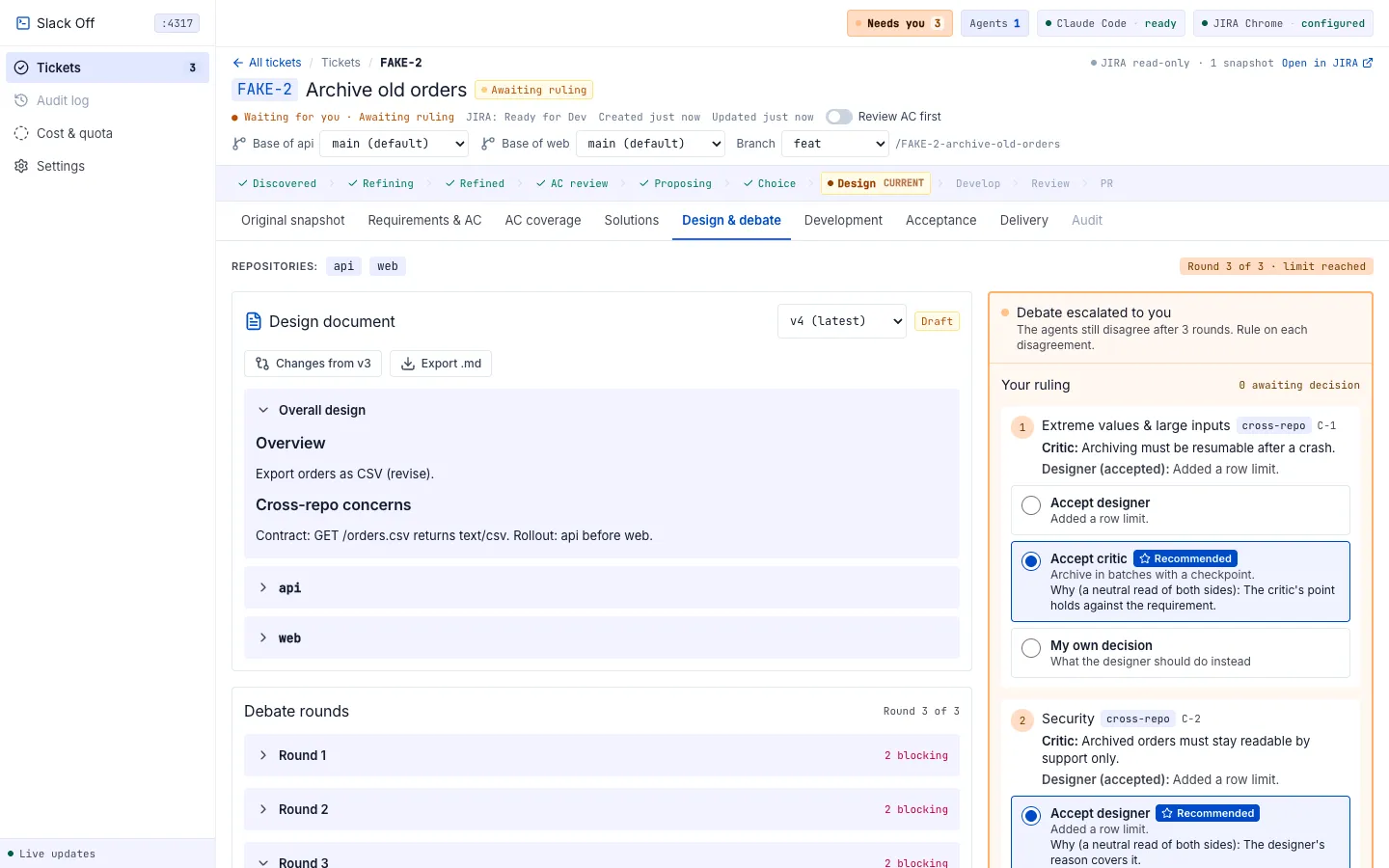
  4. Design debate. A designer agent writes the design; a critic agent reviews it against a 22-item quality checklist, round after round. Where they still disagree, you rule.
  5. Development. An agent codes in git worktrees of every affected repository, step by step. The platform runs the repository's own build, lint, test commands and git hooks, and makes the commits itself.
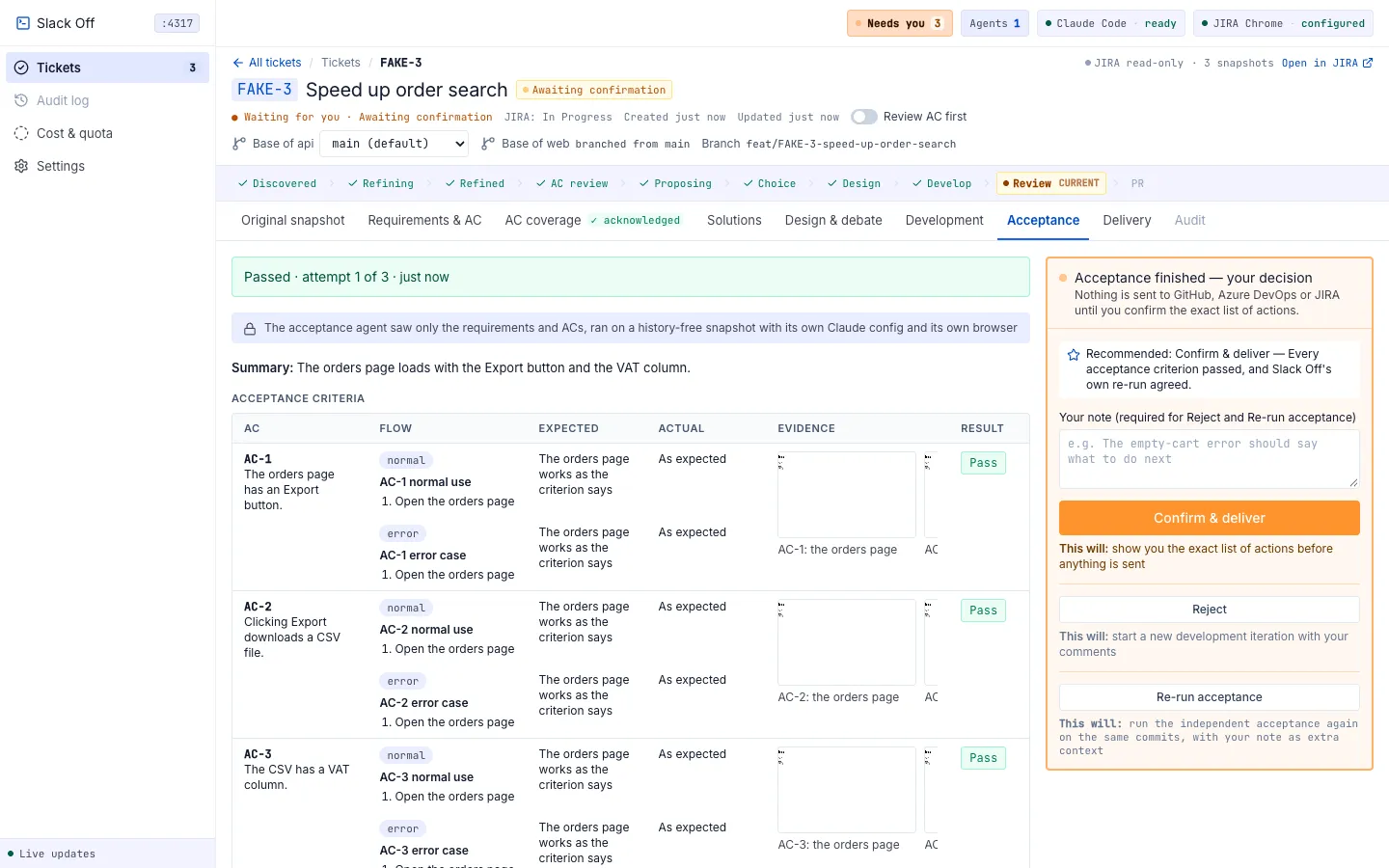
  6. Independent acceptance. A separate agent that sees only the requirements, never the design or the code history, tests a history-free copy of the code end to end and writes a report with screenshots and logs. Failures go back to development automatically, up to a limit.
  7. Delivery. After you confirm an exact list of actions: push, one pull request per repository, and optionally the JIRA status and a comment with the links.
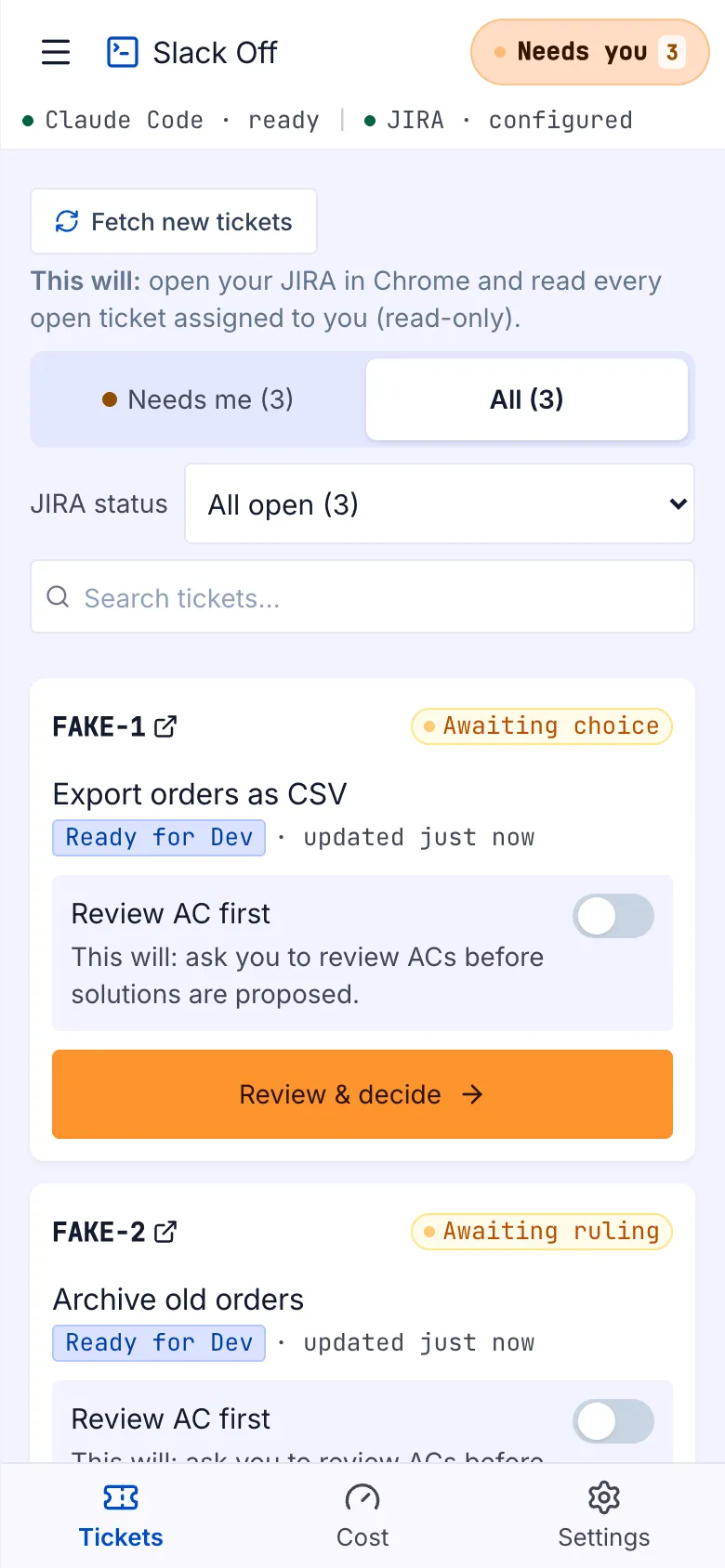
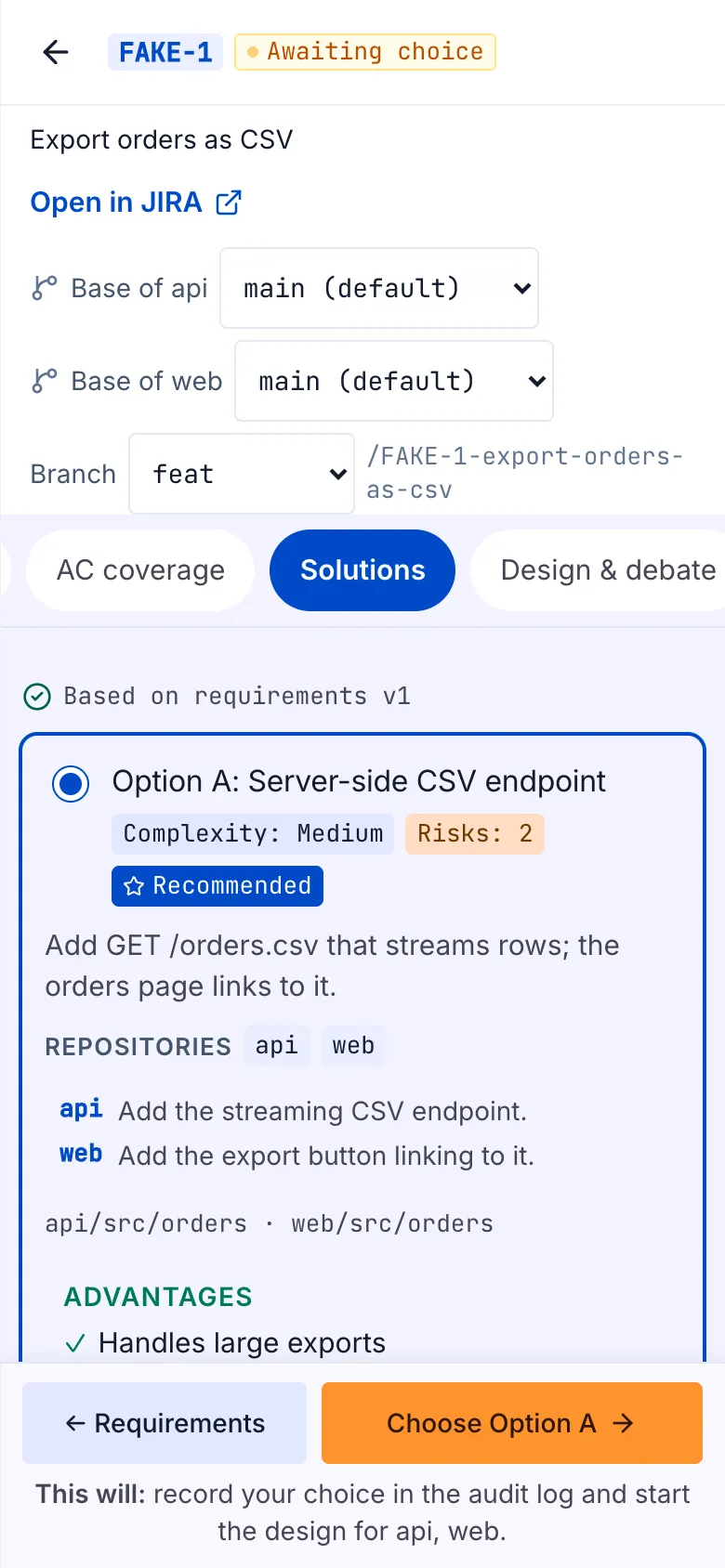
Every outward action happens only after you confirm it, and the confirmation shows exactly what will be sent. Every decision goes into an append-only audit log, with the device that made it. The layout is mobile-first, so every decision can be made from a paired phone over a private Tailscale network.

Design

The core of the design

Several agents work on a ticket, each with one job and only the context it needs. They challenge each other, and a person makes every decision that matters.

  1. Options, with their trade-offs.

    The solutions agent proposes several options, each with its complexity, dependencies, affected repositories, pros and cons and risks. You choose one.

  2. A debate before any code.

    The designer agent writes the design. An independent critic agent challenges it item by item against a 22-item quality checklist (security, performance, extensibility, reliability, testability, design principles and edge cases such as concurrency, timeouts and partial failure). The critic sees only the design, not how it was made. Blocking issues go back to the designer, round after round.

  3. A person decides when the agents can't agree.

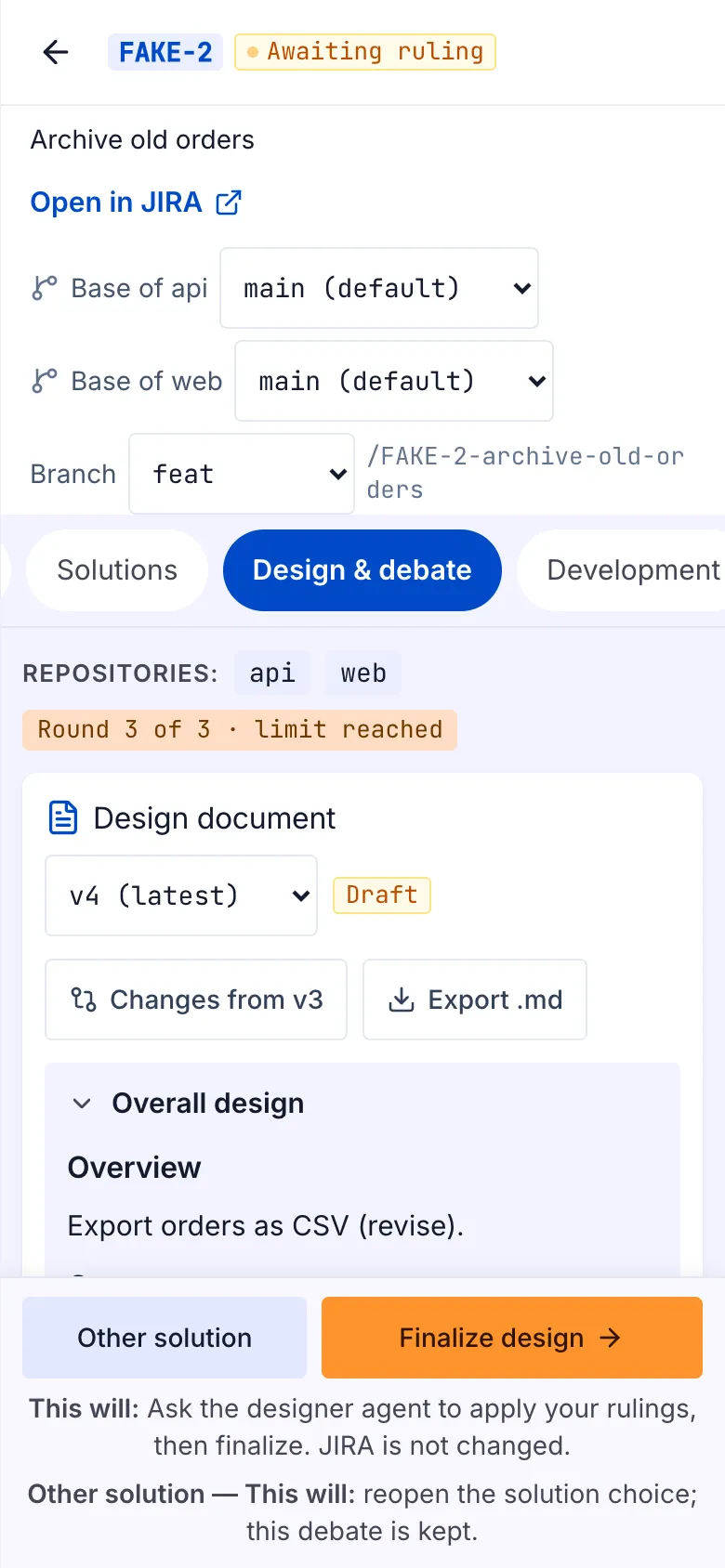
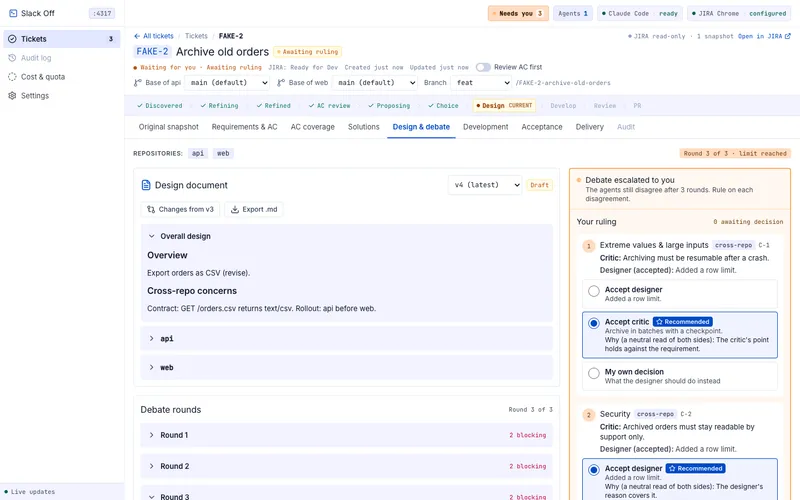
    After 3 rounds without agreement, the debate comes to you: accept the designer, accept the critic, or write your own decision. You can also go back and change the requirements.

  4. Acceptance by an agent that only knows the business requirements.

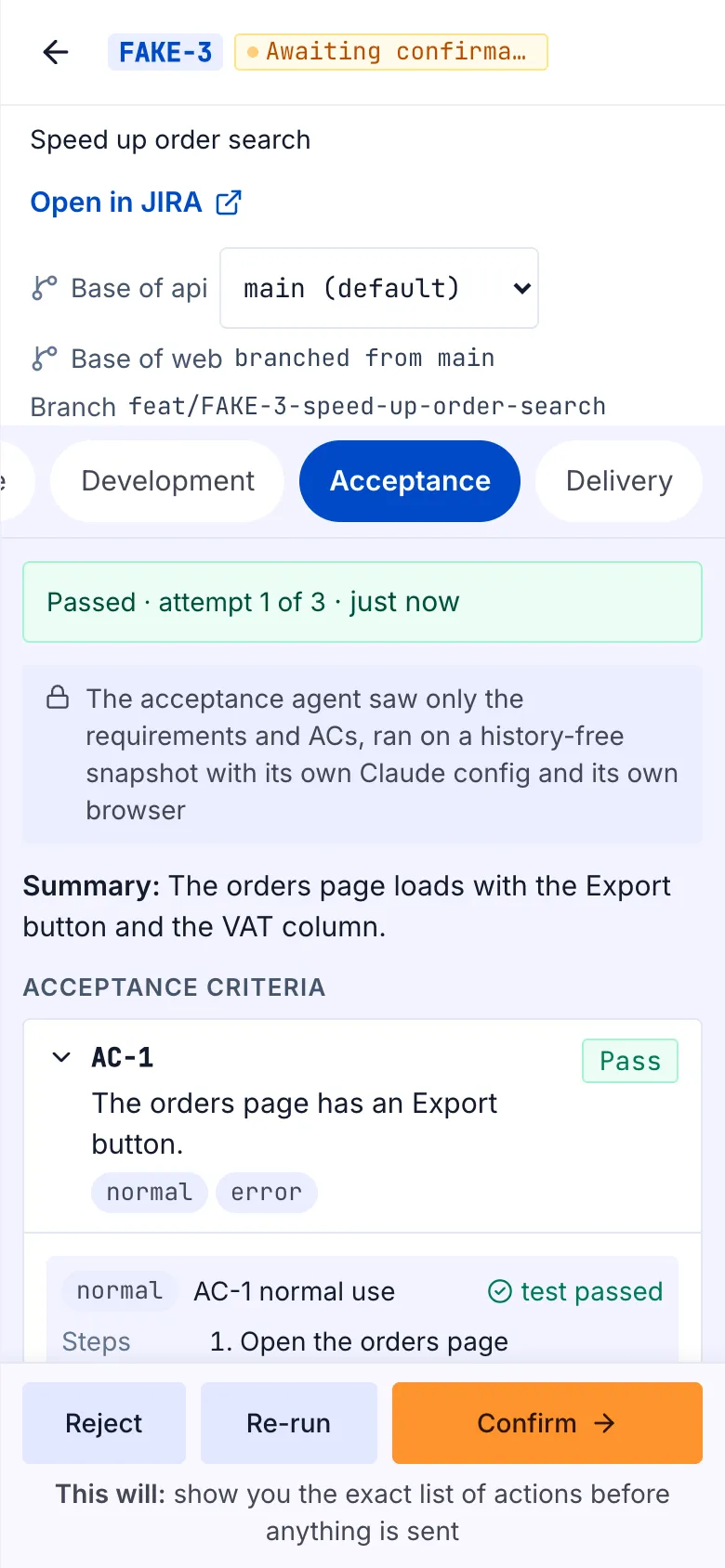
    A separate acceptance agent sees only the requirements and acceptance criteria, never the design, the debate or the code history. It tests a clean copy of the code end to end and writes a report with evidence; anything that fails goes back to development.

  5. Start again at any point.

    When a hidden risk turns up, a solution may need to be thrown away. You can go back to an earlier step or choose a different solution at any time, and the design starts again from there.

03 / Engineering artefacts

How we worked

The product was analysed and designed before it was built.

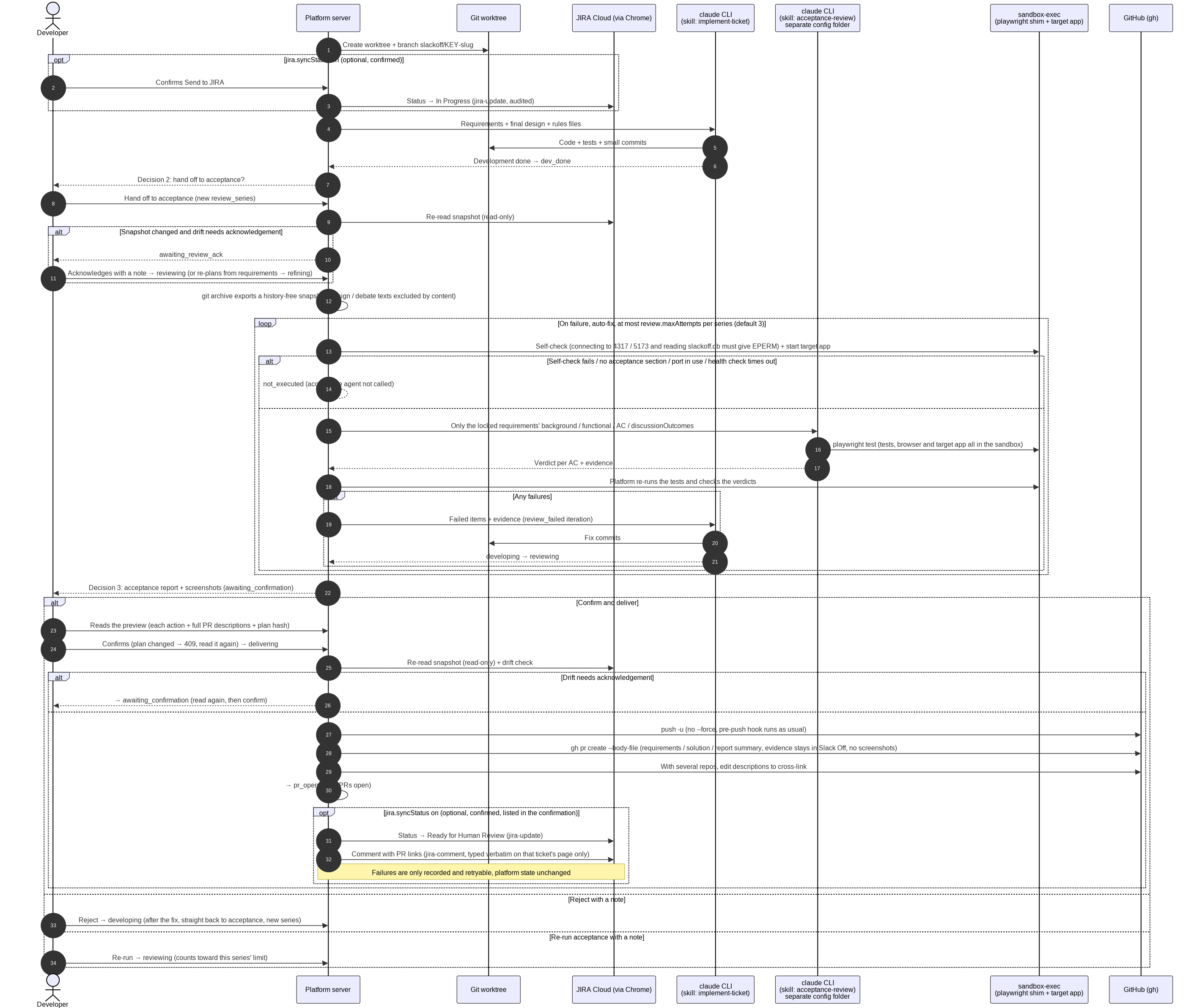
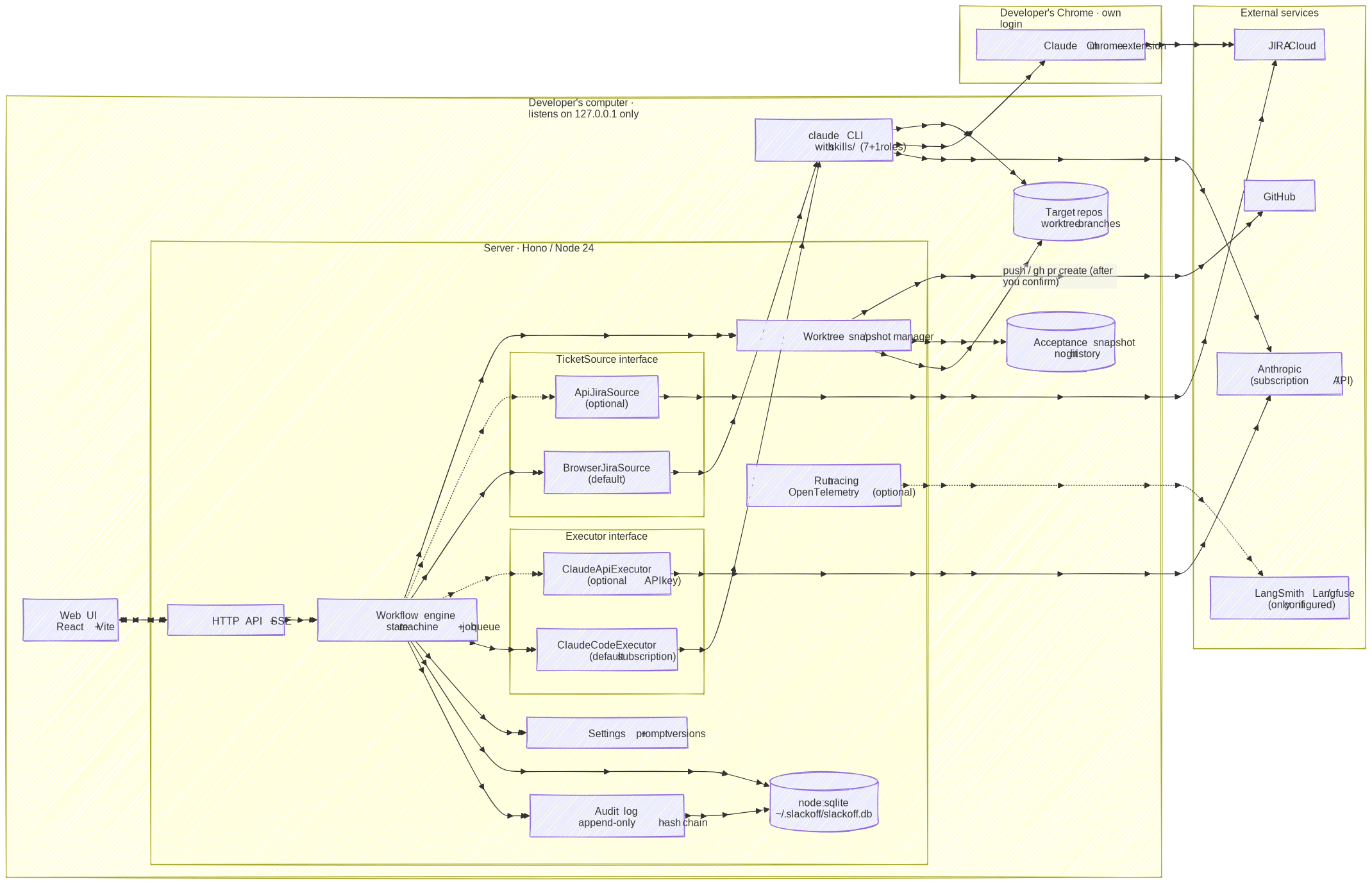
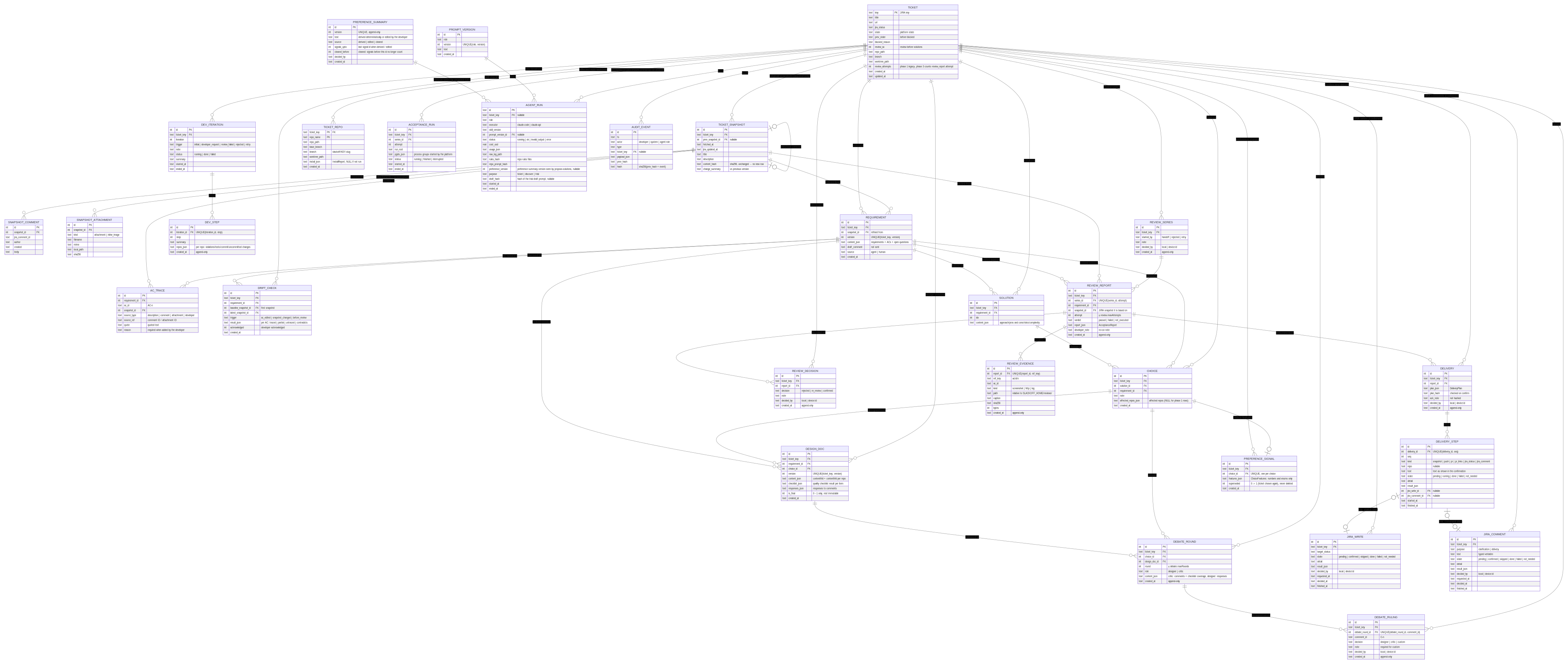
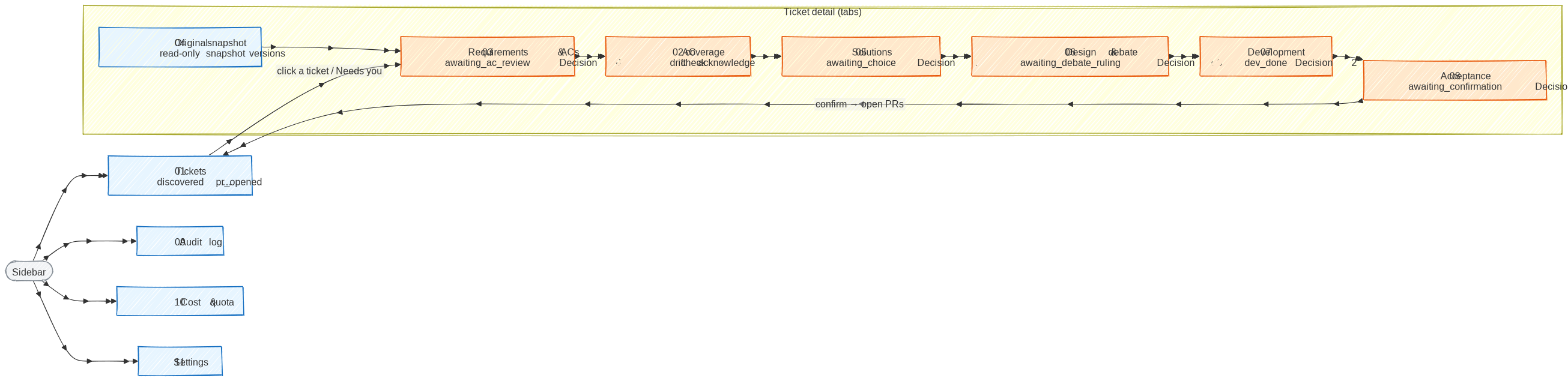
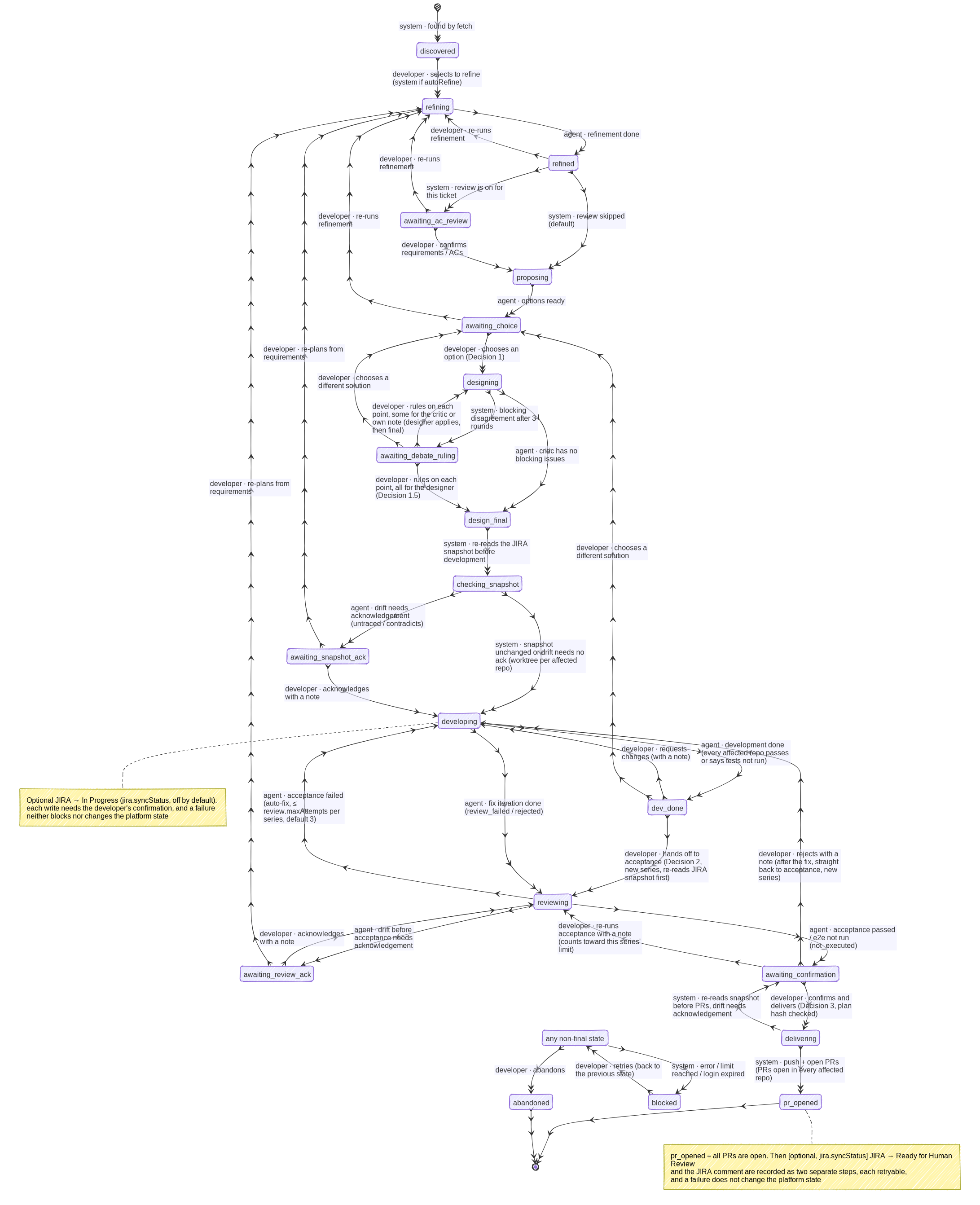
  • Business analysis boards (BA-01 to BA-06). User flow, the ticket state machine, three sequence diagrams (refine, debate, deliver), the component diagram, the data model (ER) and the screen map. Each was written as a Mermaid source for review, then laid out in Excalidraw. The boards were drawn with Chinese labels; the ones shown here are English versions rendered from translated Mermaid sources, with the same structure.
  • Functional spec. One document covering every screen, state and decision, approved before coding started.
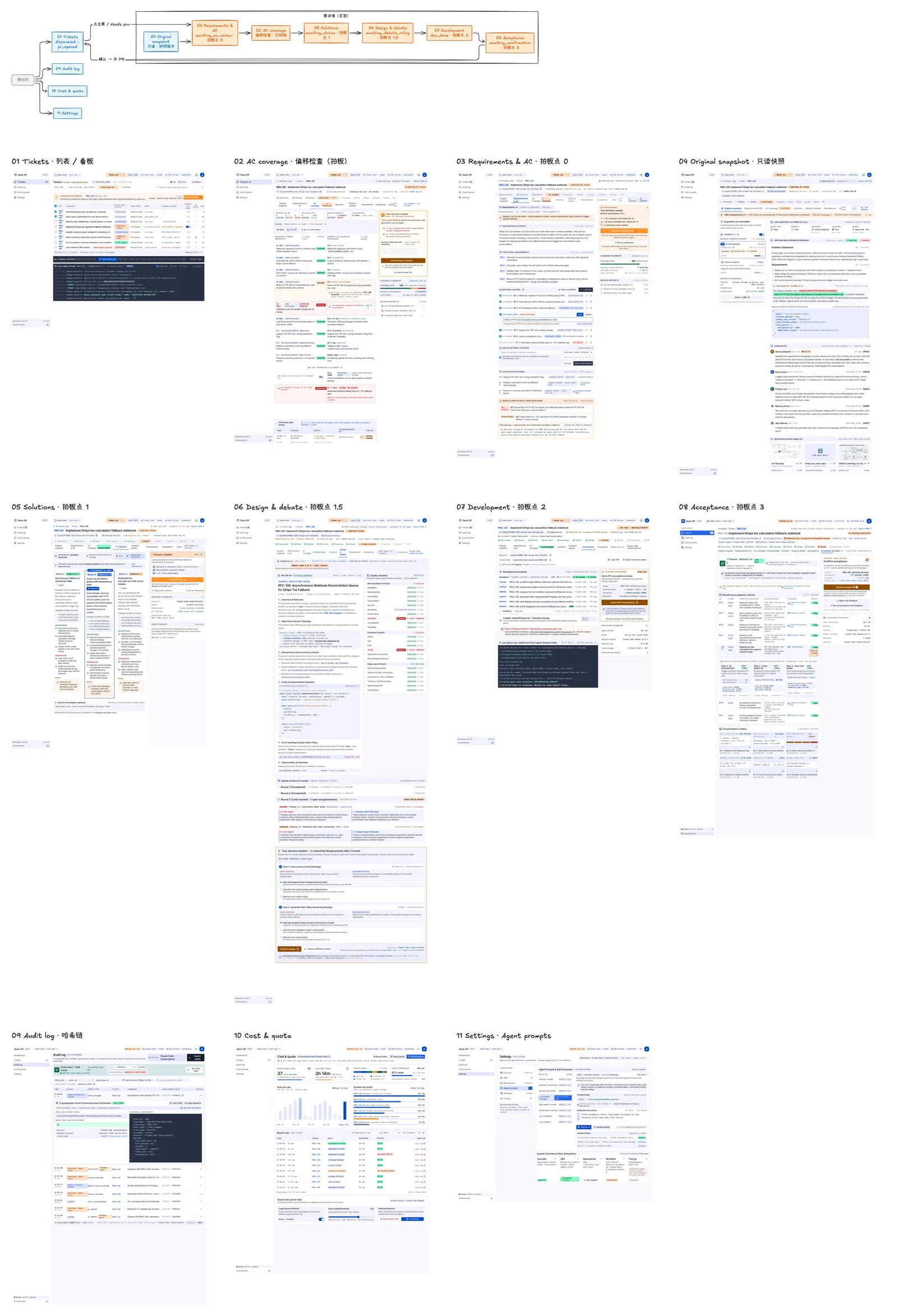
  • Screen designs. Eleven desktop screens and a mobile set, designed in Google Stitch before the code.
  • Build in phases, each with a manual exit checklist for the real JIRA, GitHub and Claude, on top of the automated tests.
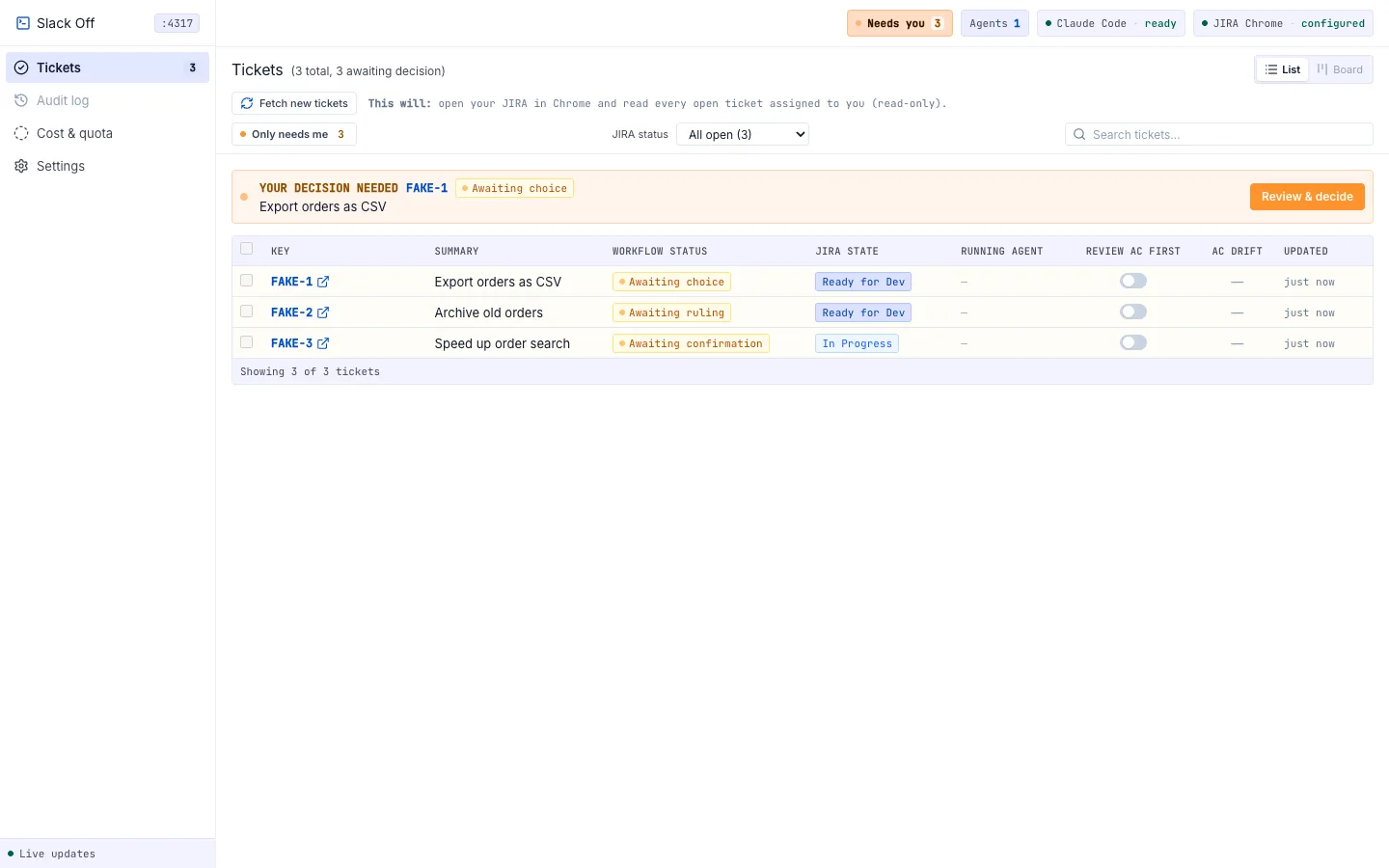
  • Screenshots generated by the tests, not drawn: a Playwright run walks the fake tickets through the workflow and captures each page at desktop and phone width.

04 / Interactive system map

How it's built

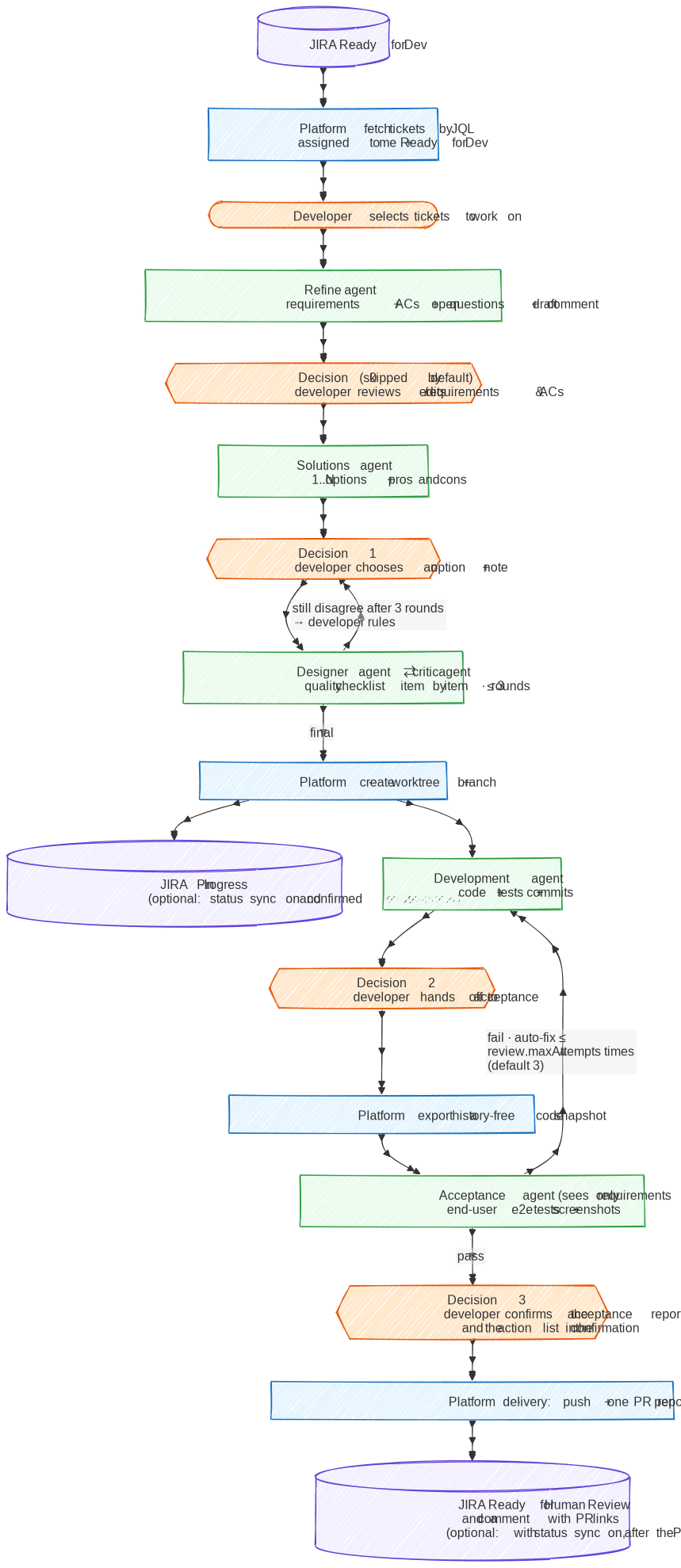
Press Play on "One ticket, end to end" to follow the same path as the BA-01 user flow above, component by component. Everything runs on your computer. The server keeps the workflow and the audit log; agents are runs of your own Claude Code CLI; every command that runs repository or agent-written code goes through the macOS command sandbox. The only ways out are JIRA, Claude and your Git host, and every write to JIRA or the Git host waits for you.

Scroll the diagram sideways to see all of it.

  • Your computer (listens on 127.0.0.1 only)
  • Your phone
  • Outside services
Every component, as text
Web UI Your computer (listens on 127.0.0.1 only)
Technology: React + Vite, mobile-first
Role: Shows every ticket, its state and the decisions waiting for you. At phone width every decision sits in a sticky bottom bar that says what will happen before you tap.
Why this way: The product is a queue of decisions, so the UI is built around "Your decision needed" cards rather than dashboards. Mobile-first so you can decide away from your desk.
HTTP API + live updates Your computer (listens on 127.0.0.1 only)
Technology: Hono on Node, Server-Sent Events
Role: Serves the UI and its API, and pushes state changes to open pages as they happen.
Why this way: Agents run for minutes; SSE lets every open page (desktop or phone) follow a ticket without polling. Requests from this computer need no token; a paired phone needs its session cookie.
Workflow Your computer (listens on 127.0.0.1 only)
Technology: State machine + job queue (TypeScript)
Role: Moves each ticket through its states (refining, proposing, designing, developing, reviewing, delivering) and stops in an awaiting_ state whenever a person must decide.
Why this way: An explicit state machine makes every pause, retry and failure visible and testable: any failure moves the ticket to blocked, and Retry continues where it stopped.
Audit log Your computer (listens on 127.0.0.1 only)
Technology: Append-only table with a hash chain
Role: Records every decision, every confirmed outward action and the device that made it.
Why this way: Agents act on your behalf, so you need a record that can't be quietly edited later. Each entry is chained to the previous one by its hash.
Database Your computer (listens on 127.0.0.1 only)
Technology: SQLite (node:sqlite), ~/.slackoff/slackoff.db
Role: Holds tickets, frozen snapshots, requirement versions with AC sources, solutions, design versions, debate rounds, rulings, development steps, acceptance reports and deliveries.
Why this way: A single-user local tool needs no database server. Snapshots and versions are only ever added, so every decision can be traced to the exact ticket text it was based on.
Executor Your computer (listens on 127.0.0.1 only)
Technology: Abstraction: Claude Code subscription (default) or Anthropic API key
Role: Starts each agent run with the right role, tools, flags and folder, and checks the agent's answer against a schema.
Why this way: One interface for both ways of paying for Claude, with the same CLI, sandbox and flags; a fake executor runs the whole workflow offline for tests and the demo.
Ticket source Your computer (listens on 127.0.0.1 only)
Technology: Abstraction: JIRA through your Chrome (default) or the JIRA REST API
Role: Fetches your open tickets, freezes snapshots, re-reads a ticket before development, acceptance and delivery, and makes confirmed status changes and comments.
Why this way: Browser mode needs no API token or admin approval, so you can try it at once; API mode is faster and costs no agent runs. Every write is read back to verify it.
Agents Your computer (listens on 127.0.0.1 only)
Technology: claude CLI + skills/ (refine, propose, design, critique, implement, acceptance, JIRA roles)
Role: Each agent role is a Claude Code skill. Every run is a fresh session with only the inputs that role should see.
Why this way: Roles are plain skills, so each can also be used by hand. Fresh sessions keep roles independent: the critic sees only the design, the acceptance agent only the requirements.
Your Chrome Your computer (listens on 127.0.0.1 only)
Technology: Claude in Chrome extension, your own JIRA login
Role: In browser mode, the JIRA agents read tickets (and make confirmed changes) in your own browser, as you would.
Why this way: Slack Off never reads or stores your JIRA login.
Worktrees and snapshots Your computer (listens on 127.0.0.1 only)
Technology: git worktree per repository, branch <type>/<KEY>-<title>
Role: Gives every affected repository its own worktree and branch, runs the declared build/lint/test commands and git hooks after each development step, and makes the commits and pushes.
Why this way: The agent never touches your own working directory and cannot run git; the platform commits only when the checks pass, and never uses --no-verify or --force.
Command sandbox Your computer (listens on 127.0.0.1 only)
Technology: macOS sandbox-exec profile, self-check before every run
Role: Runs every command that executes repository or agent-written code: installs, builds, tests, git hooks, the app under acceptance and its tests.
Why this way: Local requests are trusted as you, so any test script could call Slack Off's API. The sandbox blocks Slack Off's ports, credential folders and secret environment variables; if the self-check fails, nothing runs.
Your repositories Your computer (listens on 127.0.0.1 only)
Technology: Git, rules in .slackoff/ on the base branch
Role: Where the code lives. Each repository can declare its commands, forbidden paths, checklist items and acceptance setup.
Why this way: Rules are read from the base branch only, so the agent can't loosen them on its own branch.
Acceptance copy Your computer (listens on 127.0.0.1 only)
Technology: Exported tree, no .git, fresh run folder
Role: A copy of the committed code with no history, which the acceptance agent tests end to end with Playwright's own Chromium.
Why this way: Without history, design or debate, the acceptance agent tests what was asked for, not what was built. The platform re-runs the tests itself and trusts only its own run.
Paired phone Your phone
Technology: Browser over your Tailscale network, paired by QR code
Role: Takes every decision away from your desk: choose, rule, confirm, deliver.
Why this way: Reachable only inside your private tailnet, never the public internet. Settings, credentials and sandbox switches stay read-only on the phone.
Anthropic Outside services
Technology: Claude, through the Claude Code CLI
Role: The model behind every agent role.
Why this way: Reached only through the CLI, with tools and permissions set by Slack Off's flags.
JIRA Outside services
Technology: Jira Cloud (browser mode also Data Center)
Role: Where tickets come from; optionally receives a status change and a comment with the PR links.
Why this way: Read freely, written only after you confirm the exact change.
Git host Outside services
Technology: GitHub (gh CLI) or Azure DevOps (az CLI)
Role: Receives the push and one pull request per repository, each linking the others.
Why this way: Pushed only after you confirm, exactly the commit acceptance tested. Slack Off never merges, adds reviewers or labels.
Tracing (optional) Outside services
Technology: OpenTelemetry over HTTP (e.g. Langfuse, LangSmith)
Role: Receives agent-run spans when you export them.
Why this way: Off by default; every export is previewed and confirmed, metadata only unless you choose to include prompts.
How a request travels

One ticket, end to end

  1. JIRA: JIRA · Ready for Dev: the ticket is waiting in JIRA.
  2. Ticket source: The platform fetches the tickets assigned to you that are Ready for Dev, through your own Chrome or the JIRA API.
  3. Web UI: You select the tickets to work on.
  4. Agents: The refine agent writes requirements, acceptance criteria, open questions and a draft comment, each traced to its source.
  5. Web UI: Decision 0 (optional): you review or edit the requirements and ACs.
  6. Agents: The solutions agent proposes options with their trade-offs: complexity, dependencies, affected repositories, pros and cons, risks.
  7. Web UI: Decision 1: you choose an option and add a note.
  8. Agents: The designer agent writes the design; an independent critic agent checks it item by item against the quality checklist (security, performance, extensibility, reliability…), for up to 3 rounds. Still disagreeing? It comes back to you.
  9. Worktrees and snapshots: The platform creates a worktree and a branch in every affected repository.
  10. Command sandbox: The development agent writes the code, tests and commits; the repository's own build, lint and tests run in the command sandbox.
  11. Web UI: Decision 2: you hand the work off to acceptance.
  12. Acceptance copy: The platform exports a history-free copy of the committed code.
  13. Agents: The acceptance agent, which sees only the business requirements and ACs, tests it end to end with screenshots. A failure goes back to development for an automatic fix, up to 3 times.
  14. Web UI: Decision 3: you confirm the acceptance report and the exact list of actions.
  15. Git host: Delivery: a push and one pull request per repository, linked to each other.
  16. JIRA: JIRA · Ready for Human Review, with a comment linking the pull requests (if you turned status sync on).

Refine a ticket

  1. Web UI: You open a ticket and press Start refining.
  2. HTTP API + live updates: The API passes the command to the workflow and starts streaming updates back.
  3. Workflow: The workflow asks the ticket source for the ticket.
  4. Ticket source: The ticket is read and frozen as an immutable snapshot: text, comments, attachments.
  5. JIRA: JIRA is only read here, through your Chrome or the REST API.
  6. Executor: The executor starts the refine agent with the snapshot as its only input.
  7. Agents: The refine-ticket skill writes requirements and acceptance criteria, each quoting its source in the ticket.
  8. Anthropic: Claude does the reading and drafting.
  9. Executor: The answer is checked against the requirement schema; a malformed answer is retried, not shown.
  10. Database: The requirement version and its AC sources are stored next to the snapshot they came from.
  11. Web UI: The ticket now waits for you: review the ACs, edit them (a drift check runs on each edit), or send the agent's question to the reporter.

Test it independently

  1. Web UI: Development is done and committed. You press Hand off to acceptance.
  2. Ticket source: The ticket is re-read; if it changed in JIRA, you acknowledge the change first.
  3. Worktrees and snapshots: Each repository's tested commit is exported without git history into a fresh run folder.
  4. Acceptance copy: The acceptance copy: no history, no design, no debate.
  5. Executor: The acceptance agent starts with its own Claude configuration and only the locked requirements and ACs.
  6. Agents: It writes Playwright specs for each AC: normal, error and boundary flows.
  7. Command sandbox: The app and the browser tests run inside the acceptance sandbox, with Playwright's own Chromium.
  8. Workflow: The platform re-runs every test itself and takes results only from its own run. A failed AC goes back to development automatically, up to the limit.
  9. Web UI: The report shows each AC with expected and actual results and screenshots. You confirm, reject or re-run.

Deliver a PR

  1. Web UI: You press Confirm & deliver. The confirmation lists every push, pull request and JIRA change, in order, with the full PR descriptions.
  2. Workflow: If anything changed since you opened the confirmation (a new commit, a PR opened meanwhile), it refuses and shows the new plan.
  3. Audit log: Your confirmation is recorded with the device that made it.
  4. Ticket source: The ticket is re-read once more before anything is sent.
  5. Worktrees and snapshots: Each repository pushes exactly the commit acceptance tested. Your pre-push hook runs; never --force.
  6. Git host: One pull request per repository, each linking the others. Slack Off never merges.
  7. JIRA: If status sync is on: Ready for Human Review and one comment with the PR links, both verified by a read-back.
  8. Web UI: The ticket shows PR opened. A failed step blocks the delivery; Retry continues from the first step not done.

05 / Engineering rationale

Key decisions

Agents propose; the platform acts.

The development agent can’t run git, has no web or browser tools, and its shell can run only the repository’s declared commands. The platform makes the commits and pushes.

Why The agent's mistakes stay inside a worktree, and every action outside is code we can test.

Trade-off Less freedom for the agent, so some tasks need a person.

One confirmation is the whole authorization.

Delivery shows the ordered list of every push, pull request and JIRA change, with the full PR descriptions. If anything changes before you confirm, Slack Off refuses and shows the new plan.

Why "Approve" must mean approving exactly what happens.

Acceptance is independent by construction.

The acceptance agent gets only the locked requirements, a copy of the code without git history, its own Claude configuration and its own Playwright browser. The platform then re-runs the tests itself and takes results only from its own run.

Why An agent that saw the design and the debate would test what was built, not what was asked for.

A sandbox, because local requests are trusted.

Requests from the computer itself need no token, so any test or install script could call the API as you. Every command that runs repository code runs under sandbox-exec, which blocks Slack Off’s ports, credential folders and secret environment variables, and a self-check runs before every run.

Why Tokens can't stop a process running as you; the OS sandbox can.

Trade-off macOS only, and the README lists the residual risks plainly.

Swappable executor and ticket source.

Agents run through an Executor (Claude Code subscription or an Anthropic API key) and tickets come from a TicketSource (JIRA through your own Chrome, or the JIRA REST API).

Why The browser mode needs no admin approval to try; the API mode suits daily use. Fake versions of both make the whole workflow testable offline.

An audit log that can't be quietly edited.

Append-only, with a hash chain, recording every decision and the device that made it.

The Design and debate tab of Slack Off (fake mode, fictional ticket)

06 / Try it

Interactive demo with sample data. No AI is called.

Walk one fictional ticket from the list to delivery and make each decision yourself: choose a solution, rule on the design debate, read the acceptance report, confirm the delivery.

Start the demo

07 / Outcomes

Results and links

  1. A step-by-step install guide, with a check after every step.
  2. Tested: unit tests and type checks on every package, and sixteen Playwright end-to-end projects at desktop and 390×844 phone width against a fake-mode server, including both sandbox paths.
  3. Runs on its own in GitHub: CI on every pull request, a nightly full run that opens an issue on failure, and Dependabot.
  4. Every agent role is also a plain Claude Code skill that can be used without the platform.

Next step

Want agents like this working on your process?

Tell me what you need